If you are reading this you have probably hit the ceiling of what Yahoo Finance can do for serious stock research. You want more historical data, ratios that don’t require a spreadsheet, and an interface that helps you focus instead of selling you ads.
This article is published by the STOK Terminal team. We are building a fundamental analysis app for independent investors and we will include it in the comparison — but we will be transparent about its current state (early access via waitlist) and fair to every other option on the list. All prices below were verified against the official sites between May and July 2026.
Quick answer: Yahoo Finance is great for free quotes and news, but its free tier is shallow for fundamental analysis (~5 quarters of history, no pre-calculated ROIC or FCF yield). For depth, weigh Yahoo Finance Gold ($39/mo) against Koyfin Plus ($49/mo) and InvestingPro Pro+ ($34.99/mo). For multi-year fundamentals tied to your watchlists and portfolio, STOK Terminal (early access, €6.95/mo once access is activated) is the focused pick.
Related: Investing.com alternatives · Can ChatGPT and Gemini actually analyze stocks? · TradingView for fundamental analysis · TIKR and Koyfin alternatives
What Yahoo Finance Does Well
It would be unfair not to acknowledge Yahoo Finance’s strengths. There are reasons it is the most used financial site in the world:
- Total accessibility. Quotes, charts and headlines for free, with no sign-up.
- Massive market coverage. Stocks, ETFs, mutual funds, crypto, FX, commodities — all in one site.
- Strong news flow. Aggregated headlines from many sources keep the day’s market sentiment close.
- A large community. Per-stock message boards have a huge user base.
- Basic portfolio tracking for casual position monitoring.
For looking up a quote before a meeting or scanning the day’s news, Yahoo Finance is hard to beat.
Where Yahoo Finance Falls Short
The problem starts the moment you try to do real fundamental analysis:
- Limited free historical data. The free tier typically shows only a few quarters/years of statements per company. To get the long history needed for cycle analysis, you have to subscribe to Yahoo Finance Premium.
- No ROIC, no FCF Yield pre-calculated. Two of the most important fundamental metrics are simply not surfaced on free tier company pages.
- An aggressive ad experience. Banners, video ads, sponsored content and recommendation widgets fight for your attention while you try to analyze.
- Limited visualization. Financial data is shown mostly in raw tables. There are no built-in multi-year ratio charts for ROIC, margins or FCF.
- News feed quality is uneven. Real news is mixed with clickbait and sponsored articles. Filtering signal from noise takes effort.
- Fragmented workflow. Properly researching a single stock typically means opening 3–4 other tools (a screener, an SEC filings site, a charting tool, a portfolio tracker).
If you are deciding what to do with thousands of dollars of savings, that is not enough.
Yahoo Finance Premium: Prices in 2026
It is worth being precise. As of May 2026, Yahoo Finance offers three premium tiers (information as published on the official Yahoo plans page):
- Bronze — about $9.95/month.
- Silver — about $24.95/month.
- Gold — about $39/month.
The Gold tier is the one that meaningfully expands historical financial data (up to about 40 years of exportable annual and quarterly statements for global stocks) and removes most ads. Lower tiers add some features but the depth jump happens at Gold.
So when people complain about Yahoo Finance “lacking depth”, they usually mean the free tier. The depth exists, but it is now firmly behind a paywall comparable in price to Morningstar or Koyfin.
What to Look For in a Real Yahoo Finance Alternative
Before comparing tools, it helps to define what matters for fundamental analysis:
- Depth of historical data — ideally 10+ years of statements to cover a full economic cycle.
- Key ratios pre-calculated — ROIC, FCF Yield, margins, leverage, without spreadsheet work. We covered the most important ones in our ROIC guide and Free Cash Flow guide.
- Multi-year visualization — charts that let you spot deteriorating fundamentals at a glance.
- A clean, ad-free interface. Tools should help you focus.
- Portfolio tracking with context — not just holdings, but how the fundamentals of what you own are evolving.
- A reasonable price. Bloomberg costs $24,000/year. A retail investor tool should not.
The Best Yahoo Finance Alternatives Compared (2026)
Morningstar Investor — Best Analyst Research, Premium Price
Morningstar’s stock research is one of the few products that genuinely earns its premium positioning. Their Economic Moat framework, Fair Value estimates and analyst reports are widely respected.
Strengths:
- Economic Moat ratings and independent analyst reports are unique on this list.
- Fair Value estimates backed by transparent DCF models.
- Best-in-class mutual fund and ETF analysis.
- Portfolio X-Ray gives useful asset allocation breakdowns.
Weaknesses:
- The free tier is severely limited. Most useful features require Morningstar Investor at $34.95/month.
- Built around following analyst opinions rather than DIY analysis.
- The interface feels dated and DIY ratio comparisons are not the strength.
Best for: Investors who want analyst opinions, Moat ratings and fund analysis.
Finviz — Best Free Screener, Almost No History
Finviz remains the screener of choice for many retail investors. Fast, visual, packed with filters.
Strengths:
- A genuinely useful free screener with 60+ filters.
- Heatmaps for instant market overviews.
- The free tier is far above most “free” tools.
Weaknesses:
- Almost no historical data. You see current ratios, not multi-year trends.
- No ROIC, no FCF trends, no margin evolution.
- Company detail pages are thin.
- Finviz Elite is $39.50/month. Elite adds real-time data, pre-market scanning, backtesting and an ad-free experience — but does not solve the depth problem.
Best for: Idea generation and screening. Not a replacement for Yahoo’s depth.
Simply Wall St — Best Visuals, Risky Oversimplification
Simply Wall St turns financial data into infographics — the snowflake chart, scorecards, automated “fair value” numbers.
Strengths:
- Probably the most visually appealing tool in this list.
- Strong international coverage.
- Real free tier (5 reports/month, 1 watchlist, 1 portfolio).
Weaknesses:
- Oversimplification is real. A single “fair value” number with limited transparency around its assumptions can mislead more than it helps.
- Premium is $10.95/month; Unlimited is around $21.50/month. Premium adds 30 reports/month and 3 portfolios; Unlimited removes the report cap and allows 5 portfolios.
- Limited side-by-side metric comparison.
Best for: Beginners who want a visual overview. Risky if used as a sole analysis tool. Head-to-head: STOK Terminal vs Simply Wall St.
Koyfin — Closest to Bloomberg, Higher Learning Curve
Koyfin is the closest thing to a Bloomberg terminal that an independent investor can afford. Customizable, data-rich, professional-feeling.
Strengths:
- Excellent breadth and depth: equities, ETFs, fixed income, macro and global coverage.
- Highly customizable dashboards.
- Strong peer comparison and screening.
Weaknesses:
- The learning curve is real. Expect a few hours of setup before it feels productive.
- The free tier is genuinely useful (2 watchlists, 2 screens, 2 dashboards, 2 years of financials, 1 year of forward estimates) but limited if you want long history.
- Koyfin Plus is $49/month on monthly billing — it unlocks 10-year financials, unlimited watchlists/dashboards, filings, transcripts.
Best for: Power users who want institutional-grade depth and don’t mind learning a new tool.
InvestingPro — Best for Existing Investing.com Users
Investing.com’s premium product, InvestingPro, has matured into a more credible fundamental analysis tool than the free site suggests.
Strengths:
- Standard pricing of $13.99/month for Pro, and $34.99/month for Pro+.
- Pro+ specifically includes 10-year financial history, 1200+ metrics, a stock screener and data export.
- Ad-free experience on Pro and above.
- The free economic calendar remains best-in-class and stays free.
Weaknesses:
- The free Investing.com experience itself is ad-heavy; the upgrade path is effectively mandatory for real research.
- Heavy emphasis on Investing.com proprietary “Fair Value” and AI picks, which may not match a Buffett-style framework.
Best for: Investing.com regulars who want depth without leaving the ecosystem.
Macrotrends — Free Long-History Data, Rough Experience
Macrotrends offers something rare: free access to long-history financials for thousands of companies.
Strengths:
- 10–20 years of historical income statements, balance sheets and cash flow data for most U.S.-listed companies.
- Charts with automatic YoY growth, 5-year and 10-year CAGRs.
- Free to access without an account.
Weaknesses:
- Slow site, dated design, ad-heavy.
- No screener, no portfolio tools, no real peer comparison.
- Data should be cross-checked against primary 10-K filings for important decisions.
- Mostly U.S. coverage.
Best for: Investors who need long-history U.S. data and tolerate a rough interface.
Looking for 30+ years of fundamentals connected to your watchlists and portfolio in one place? Join STOK Terminal free — STOK Terminal is built for independent investors who want fundamentals close to the companies they actually follow.
Yahoo Finance Alternatives — Comparison Table (Updated July 2026)
| Tool | Free tier history | Premium price (monthly) | Pre-calc ROIC & FCF | Multi-year visuals | Portfolio tracking |
|---|---|---|---|---|---|
| Yahoo Finance | ~5 quarters | Bronze $9.95 / Silver $24.95 / Gold $39/mo | Premium-gated | Limited | Basic |
| Morningstar | Limited | $34.95/mo | Yes (premium) | Limited | Portfolio X-Ray |
| Finviz | Current snapshot only | Elite $39.50/mo | Partial | Heatmaps | No |
| Simply Wall St | 5 reports/mo | Premium $10.95 · Unlimited ~$21.50/mo | Yes (limited) | Excellent | Limited |
| Koyfin | 2 yrs financials | Plus $49/mo | Yes | Good | Limited |
| InvestingPro | Calendar + basics | Pro $13.99 · Pro+ $34.99/mo | Yes (Pro+) | Good | Limited |
| Macrotrends | 10–20 yrs U.S. | Free (some premium add-ons) | Yes | Basic | No |
| STOK Terminal | Early access via waitlist — up to 30+ yrs | Early access · €6.95/mo once access is activated | Yes | Focused | Yes, integrated |
The Problem None of These Tools Fully Solve
Each option above does something well. The pattern is also clear:
- The genuinely free tools (Macrotrends, Finviz free) lack workflow.
- The deep tools (Koyfin Plus, Morningstar Investor, InvestingPro Pro+) cluster between $20 and $40/month.
- The visual tools (Simply Wall St) flatten complexity in ways that can mislead.
- Few of them connect portfolio tracking with company fundamentals natively. You can track holdings in one tool and analyze fundamentals in another, but joining the two — “how are the fundamentals of what I own evolving?” — usually requires manual work.
That last gap is what most independent investors end up filling with spreadsheets.
What STOK Terminal Is Building (and Honest Caveats)
STOK Terminal is currently in early access, opened from a free list in signup order. Joining the list is free and creates no charge; we say so upfront. Early users pay €6.95/month once they activate their access — a 50% discount off the €13.90 public price — and keep that 50% discount on the future public price while their subscription remains active. If they cancel and return later, the then-current price will apply. Nothing is charged while you wait on the list, and the trial only starts when you accept your invitation.
What is shipped today in early access:
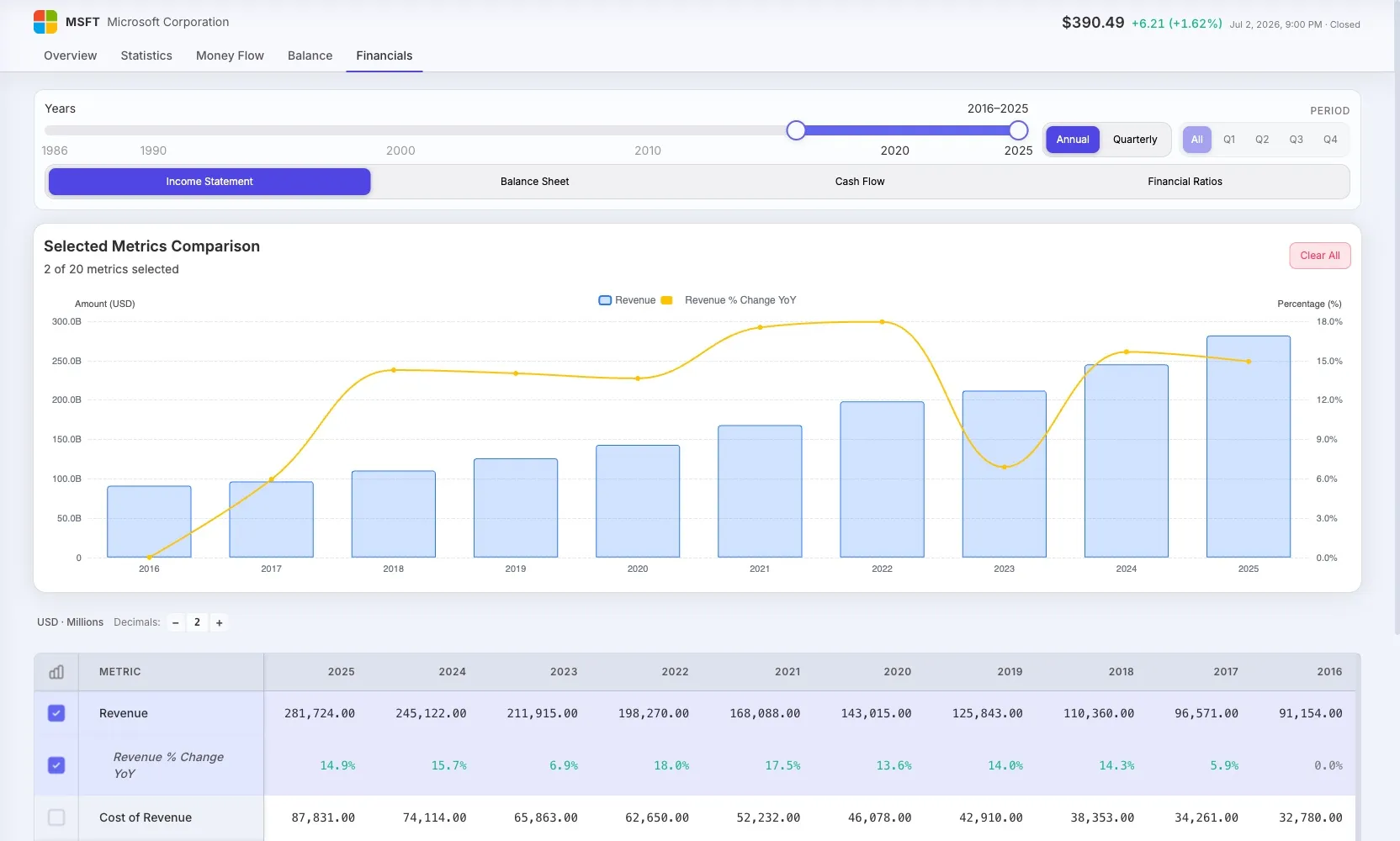
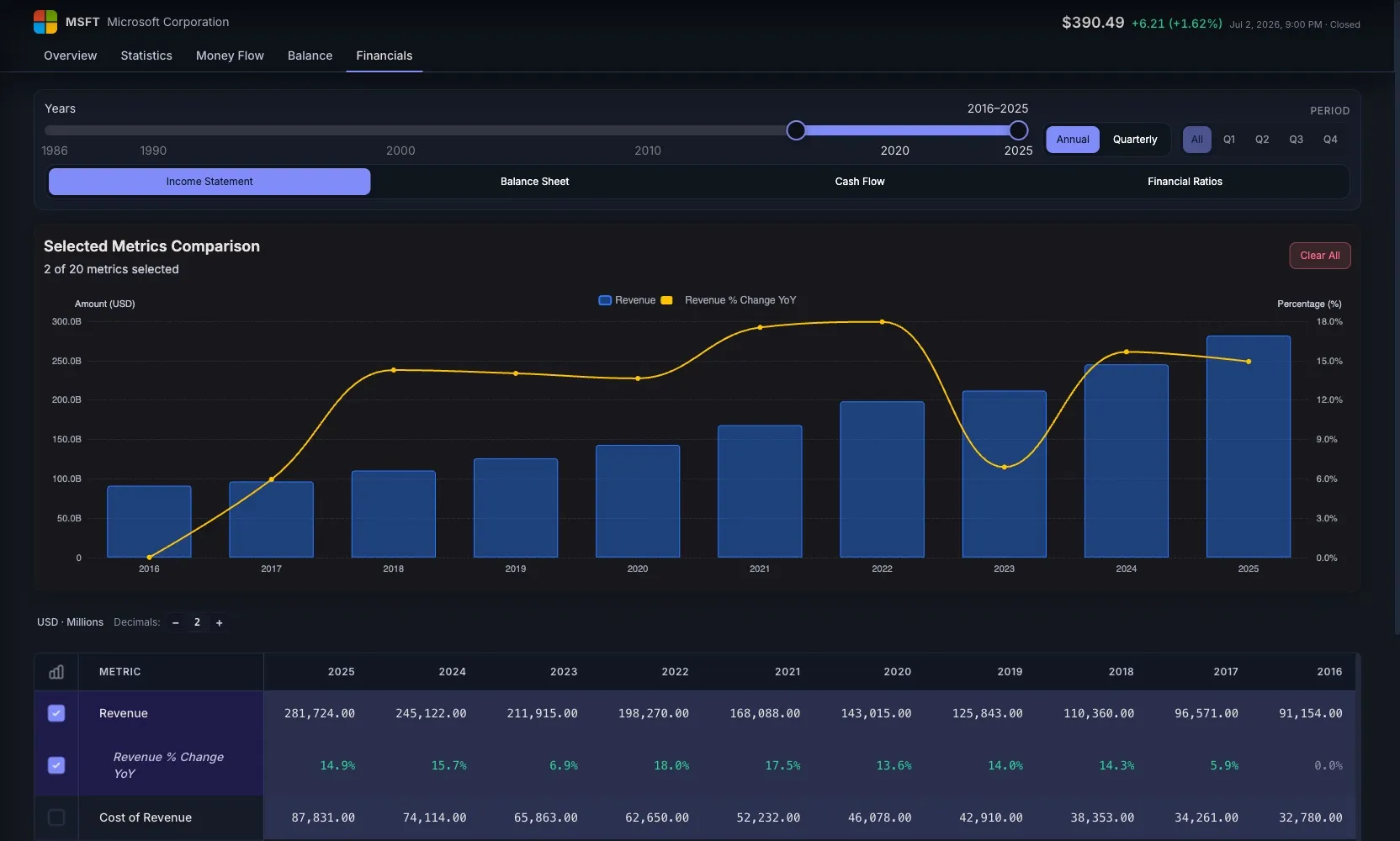
- Company Fundamentals — income statement, balance sheet, cash flow and ratios per company — annual and quarterly, with up to 30+ years of history depending on company and plan — in side-by-side multi-year tables.
- Documents & notes — open filings like the 10-K or annual reports and keep per-company notes, with history and links, without leaving the company page.
- Company Overview — price chart, profile, analyst consensus (where available) and key statistics linked to fundamentals.
- Watchlists with quotes, news, price history and ticker-level company access. See our watchlist framework for how we think about them.
- Portfolio tracking — real positions or simulated portfolios, with holdings, cash, performance and a full transaction ledger.
- Performance dashboard — cost, value and allocation broken down per position, on top of your portfolio\x27s full transaction ledger.
- Market Overview — indices, movers, sectors and market news, designed as context for company research rather than a news feed.
What we explicitly do not offer (yet, or by design): Morningstar-style analyst reports, Moat ratings, the Investing.com economic calendar, or Bloomberg-class real-time data. We are building a tighter workflow, not a wider feed.
How We Compared
So you can judge the method, not just the conclusions, here is how this comparison was built:
- Official-source pricing, dated. Every price was taken from the vendor’s own site (May 2026; the monthly billing rates of Koyfin and others re-verified on July 11, 2026). We quote each plan’s monthly rate — most vendors discount annual payment. Promotional and regional prices change — which is why we date them instead of quoting an “eternal” number.
- Fundamental-analysis focus, not trading. We judge each tool by what matters for reading a business over time: history depth, pre-calculated ratios (ROIC, FCF), comparable tables and research workflow.
- Hands-on use, not marketing sheets. Assessments come from using the tools and checking their plan limits on their own site, not from copying their feature pages.
- Conflict of interest disclosed. We are one of the tools on the list. That’s why we clearly mark what the others do better and which investor we are the wrong choice for.
If you want the detailed head-to-head, we have dedicated comparisons: STOK Terminal vs Yahoo Finance, vs Investing.com and vs TradingView.
How to Choose
A rough decision tree if you are leaving Yahoo Finance:
- Want analyst opinions and Moat ratings? → Morningstar Investor.
- Just need a screener and don’t care about depth? → Finviz (free, Elite only if you need real-time).
- Want pretty visuals and a simple “buy/hold” verdict? → Simply Wall St.
- Want Bloomberg-style depth and don’t mind the learning curve? → Koyfin Plus.
- Already live on Investing.com and want depth without leaving? → InvestingPro Pro+.
- Just need 15 years of free historical data? → Macrotrends.
- Want fundamentals connected to your watchlists and portfolio in one workflow? → STOK Terminal (early access via waitlist).
Frequently Asked Questions
What is the best free alternative to Yahoo Finance? Macrotrends gives free long-history U.S. financials (10–20 years) and Finviz is the best free screener. For a cleaner generalist, Stock Analysis is solid. No free tool fully matches a paid research platform on depth plus workflow.
Is Yahoo Finance Premium worth it? Yahoo Finance Gold ($39/month) unlocks up to ~40 years of exportable statements and removes most ads. It is worth it if you want a familiar generalist with real depth, but dedicated tools like Koyfin Plus or InvestingPro Pro+ offer a more polished research workflow at a similar price.
What is the best Yahoo Finance alternative for fundamental analysis? STOK Terminal keeps multi-year fundamentals tied to your watchlists and portfolio in one workflow (early access, €6.95/month once access is activated). For Bloomberg-style depth choose Koyfin; for analyst reports and Moat ratings, Morningstar.
Why move off Yahoo Finance’s free tier for research? The free tier is shallow for fundamental analysis: roughly five quarters of history, no pre-calculated ROIC or FCF yield, an ad-supported interface, and a fragmented workflow that pushes you into three or four other tools.
Is Yahoo Finance Gold worth it compared to Koyfin or Morningstar? They solve different problems. Gold ($39/mo) buys depth inside a familiar generalist: long exportable statements and fewer ads. Koyfin Plus ($49/mo) buys a dedicated research terminal with better comparison tools and dashboards. Morningstar Investor ($34.95/mo) buys analyst reports and Moat ratings rather than a DIY workflow. If you mostly read the statements yourself, pick Gold or Koyfin; if you want professional opinions to lean on, Morningstar.
Yahoo Finance vs Investing.com — which is better? For an economic calendar and multi-asset quotes, Investing.com — its free calendar is the best available. For a calmer reading experience and simple portfolio tracking, Yahoo Finance, which carries noticeably fewer ads. For fundamental depth, neither free tier is enough: compare their premium tiers (Gold $39/mo vs InvestingPro Pro+ $34.99/mo) or go to a dedicated tool.
Koyfin vs Yahoo Finance — what’s the real difference? Koyfin is a research terminal: multi-year statements, custom dashboards, comparison tables and a real screener, with a learning curve and $49/mo for Plus. Yahoo Finance is a generalist portal: great free quotes and news, with depth locked behind Gold. Data-heavy investors tend to land on Koyfin or TIKR; casual portfolio checkers stay on Yahoo.
Stop Juggling Five Tools to Research One Stock
STOK Terminal brings company fundamentals, watchlists and portfolio tracking into one focused workflow — designed for independent investors who care about fundamentals, not noise.
Join STOK Terminal free — and keep the 50% discount while your subscription stays active if the product fits your workflow.
All competitor pricing and features were verified against official sources between May and July 2026 (monthly billing rates). Promotional and regional pricing may vary. Treat this article as a starting point and confirm current numbers on each vendor’s site before subscribing.